
Every morning, Ms. Patel wakes up to a dozen alerts: a missing‑attendance note, a parent question, a birthday reminder, and a school‑wide event. She’s juggling numbers, messages, and memories before she even sets foot in the classroom.
Imagine if all that data collapsed into a single, clear sentence—just the essentials, no fluff.
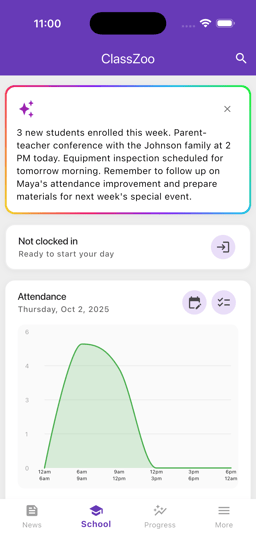
That’s the promise of ClassZoo’s new Daily Snapshot feature. In one glance, teachers see the day’s attendance, upcoming birthdays, key events, and learning trends. It’s the one‑sentence briefing that saves time, reduces stress, and lets educators focus on what matters most: teaching.
Stay with us as we dive into why this matters, how it works, and how it can transform your daily routine.
The Modern Teacher’s Challenge
Today's classroom runs on a mosaic of information sources:
- Attendance sheets spread across paper, spreadsheets, and the ClassZoo app.
- Event calendars that pull from the school district, PTA, and individual teachers.
- Birthday lists that often slip into group chats.
- Trend reports that appear once a week, too late for immediate action.
This fragmentation creates a cognitive load that can lead to missed details—an absent student unnoticed until lunch, a parent asking about a missed announcement, or a sudden schedule change that ripples through the day.
Common scenarios amplify the problem:
- Morning rush—you’re juggling a bus schedule, a parent’s question, and a new attendance slip.
- Last‑minute changes—field trips cancel, and you must inform parents in minutes.
- Parent queries—“When will Sarah’s birthday be celebrated?” or “What happened to my child’s attendance today?”
Without a single, real‑time snapshot, teachers expend precious minutes reconciling data, which could be better spent preparing engaging lessons.
Meet the Daily Snapshot AI
The Daily Snapshot is an AI‑powered summarizer built into ClassZoo that pulls data from every corner of your dashboard and distills it into a concise, bullet‑style paragraph.
Core inputs:
- Attendance records
- Birthdays & celebrations
- Upcoming events & announcements
- Daily learning trends (e.g., reading scores, math progress)
- Parent messages flagged as “urgent”
Output format: A brief paragraph of 2–3 sentences, optionally displayed as a banner or push notification.
Example:
“Today: 48/50 students present, 3 birthdays, Field Trip to the Zoo tomorrow, Reading scores up 2%.”
Privacy & Security: All data remains encrypted within ClassZoo; the AI processes information on our secure servers, never leaving the platform.
Customizability: Teachers choose which categories to include—maybe you want only attendance and birthdays, or you’d like trend data as well.
The result? A single glance that covers everything you need to know, eliminating the need to hop between screens or scroll through endless lists.
Behind the Scenes: How the AI Works
At its core, the Daily Snapshot performs two tasks: data aggregation and natural language generation (NLG).
- Data Aggregation – The AI continuously monitors ClassZoo’s databases. When a new attendance record is uploaded, a birthday is added, or an event is scheduled, a trigger updates the snapshot.
- Natural Language Generation – Using a lightweight language model, the AI translates raw numbers into readable sentences. It prioritizes clarity, conciseness, and relevance.
Real‑time Updates
- Every minute, the system checks for changes.
- If a new announcement appears, the snapshot refreshes automatically.
Personalization
- Teachers set preferences in the settings panel.
- You can toggle off categories (e.g., “exclude trend data”) or adjust the detail level (“summary vs. detailed”).
The AI runs behind the scenes, so the teacher experience remains uninterrupted and seamless.
Use‑Case Scenarios
- Morning Rush – Ms. Patel receives the snapshot on her phone during the commute. She sees 48 students present and a note that tomorrow’s field trip needs a teacher volunteer. No need to dig through the attendance spreadsheet.
- Pre‑Lesson Prep – While grading quizzes, a teacher reviews the trend summary: reading scores up 2%. She decides to extend the reading segment and incorporate additional practice.
- Parent‑Teacher Communication – A parent asks, “Will Sarah have a birthday today?” The snapshot instantly confirms Sarah’s birthday, enabling the teacher to send a quick, personalized message: “Happy birthday, Sarah! We’ll celebrate in class.”
- Planning for Special Events – The snapshot flags an upcoming school‑wide art fair. The teacher sees the event details and quickly drafts a reminder for students and parents.
These scenarios illustrate how a single sentence can inform decisions, streamline communication, and free up valuable classroom time.
Benefits & Return on Time Investment
- Time Saved: Studies show teachers spend ~30 minutes daily reconciling data. The Daily Snapshot cuts that to under 2 minutes—over 300 minutes saved per month.
- Reduced Stress: Knowing the day’s key facts at a glance lowers cognitive load, letting teachers focus on instruction.
- Improved Parental Engagement: Timely, accurate updates lead to higher parent satisfaction and trust.
- Consistency & Accuracy: Automated summarization eliminates human error that can occur when teachers manually compile reports.
- Scalability: As the class grows, the snapshot scales automatically—no extra effort needed.
Investing a few minutes to set up the snapshot can yield a higher quality teaching experience, happier parents, and more time to innovate in the classroom.
Getting Started with Daily Snapshot
- Activate the Feature – Go to ClassZoo Settings → Daily Snapshot and toggle “Enable.”
- Choose Your Preferences – Select which data categories appear and set your preferred delivery method (push notification, in‑app banner, or email).
- Set Your Schedule – Choose when you want the snapshot: at 7 AM, 8 AM, or whenever you open the app.
- Provide Feedback – After your first week, tap “Feedback” in the snapshot banner to let us know if the summary needs tweaking.
Pro tip: If you’re juggling multiple classes, set a different snapshot schedule for each to keep information relevant.
Frequently Asked Questions
Is the data secure?
All information stays encrypted within ClassZoo’s secure servers. No data leaves the platform.
Can I exclude sensitive information?
Yes, you can disable specific categories (e.g., trend data) or create custom snapshots for different audiences.
Does it replace attendance sheets?
No, the snapshot summarizes attendance—it still records the data in your existing attendance system.
How accurate is the trend analysis?
The AI uses the same metrics you set in ClassZoo’s trend reports; accuracy is on par with your manual analysis, but presented instantly.
Conclusion & Call to Action
The Daily Snapshot turns fragmented data into a single, actionable sentence—saving time, reducing stress, and boosting parent engagement.
Ready to experience the difference?
- Try it today in your free trial or schedule a personalized demo.
- Share your first snapshot in the comments below or tag us on Twitter @ClassZooApp.
Let’s keep the focus where it belongs: on learning.
For support or questions, email us at support@classzoo.app or visit our website: https://www.classzoo.app.
Happy teaching!





Comments